

A real server for you — and your AI agents.
Agents build faster when they can run things. Give them a London VM with root, a public IP and SSH, and let them code, automate and work around the clock.
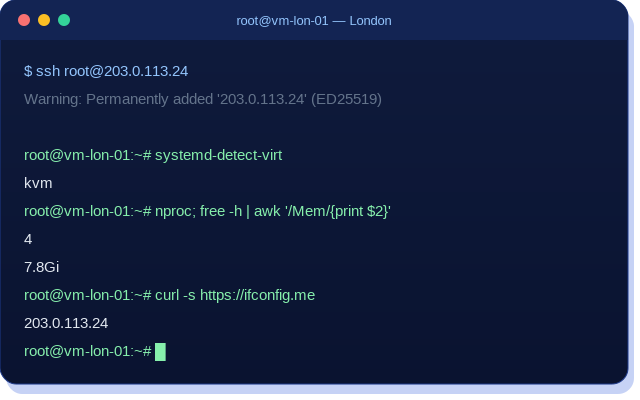
- Claude Code
- OpenAI Codex
- Cursor
- GitHub Copilot agent
- Windsurf
- Aider
- Cline
- VS Code Remote-SSH
Hand your VM to an agent in 4 steps
- Create a VMSign up, confirm your email for £20 credit, and deploy an Ubuntu or Debian server.
- Make a key just for the agentA separate SSH key you can revoke any time, added to a non-root
deployuser with sudo. - Add an SSH aliasSo the agent only needs
ssh supernet. - Give it the briefPaste the prompt on the right into your agent, or save it as
AGENTS.md/CLAUDE.mdin your repo.
# ~/.ssh/config on your machine
Host supernet
  HostName <your-vm-ip>
  User deploy
  IdentityFile ~/.ssh/supernet_agent
  ServerAliveInterval 30
# AGENTS.md — deployment target
You have SSH access to a Supernet Cloud VM:
  ssh supernet   (Ubuntu, KVM, London, public IPv4)

Rules:
- Work as the "deploy" user; use sudo only when needed.
- Run services with Docker Compose in ~/apps/<name>.
- Put Caddy in front for HTTPS on ports 80/443.
- Keep ufw on: allow only 22, 80 and 443.
- Never print or commit secrets; use .env files (chmod 600).
- Before risky changes, back up data and configs.
- After each deploy, curl the health URL and report it.
Tip: let the agent work in a branch and deploy from CI once you're happy.
Your VM is your AI agent's computer.
The model thinks; your VM does the work. Call Claude, GPT, Gemini or any model through its API, and run the agent's code, tools, browser, files and memory on a Supernet Cloud VM in London — always on, with root and a public IP.
Always-on agents
Agents that watch inboxes, queues and feeds, run on a schedule and keep working when your laptop is closed.
n8n automation + MCP
Self-host n8n and turn workflows into MCP tools that Claude, ChatGPT and Cursor can call.
Your own MCP servers
Host MCP servers for your databases, APIs and internal systems on HTTPS, with your own token.
Coding agent sandboxes
Give Claude Code or Codex a disposable VM to build and test in. Something breaks? Rebuild the VM, not your laptop.
Browser agents
Headless Chrome with Playwright for agents that fill forms, check prices, test sites and collect data.
Agent memory & data
Postgres with pgvector, Qdrant or Redis on the same VM, so your agent's memory and RAG data stay in the UK.
n8n with MCP on your own VM
Run n8n in Docker behind HTTPS. Build a workflow, add the MCP Server Trigger node and every tool you attach becomes callable by your AI apps. Use the MCP Client Tool node to let n8n's own AI agents use other MCP servers.
# ~/apps/n8n/compose.yaml
services:
  n8n:
    image: docker.n8n.io/n8nio/n8n
    restart: unless-stopped
    ports: ["127.0.0.1:5678:5678"]
    environment:
      - N8N_HOST=n8n.example.com
      - N8N_PROTOCOL=https
      - WEBHOOK_URL=https://n8n.example.com/
      - GENERIC_TIMEZONE=Europe/London
    volumes: ["n8n_data:/home/node/.n8n"]
volumes:
  n8n_data:
# Caddyfile — automatic HTTPS
n8n.example.com {
  reverse_proxy localhost:5678
}

$ docker compose up -d
# open https://n8n.example.com
# create the owner account, add an
# MCP Server Trigger node, copy its URL
- Example: “Create invoice”, “Check stock”, “Send SMS” workflows as tools for Claude
- Webhooks work: the VM has its own public IPv4
- Start with 2 vCPU and 4 GB RAM; add more as workflows grow
Host your own MCP server
Wrap your own API or database as MCP tools in a few lines, run it on the VM, and connect it to your coding agent.
A Python MCP server
Using FastMCP over streamable HTTP, listening only on localhost.
# ~/apps/mcp/server.py   (pip install fastmcp)
from fastmcp import FastMCP
mcp = FastMCP("shop-tools")

@mcp.tool
def check_stock(sku: str) -> dict:
    """Return stock level for a product SKU."""
    return {"sku": sku, "in_stock": 12}

mcp.run(transport="http",
        host="127.0.0.1", port=8000)
Publish it with a token
Caddy adds HTTPS and refuses requests without your secret token.
# Caddyfile
mcp.example.com {
  @ok header Authorization "Bearer {$MCP_TOKEN}"
  handle @ok {
    reverse_proxy 127.0.0.1:8000
  }
  respond 401
}

# on your laptop
$ claude mcp add --transport http shop \
    https://mcp.example.com/mcp \
    --header "Authorization: Bearer $MCP_TOKEN"
Agents that run on their own
A nightly maintenance agent
Run Claude Code headless on the VM every night: update dependencies, run tests and open a pull request for you to review.
# crontab -e   (as the deploy user)
0 2 * * * cd ~/repos/api && \
  claude -p "Update dependencies, run
  the tests, and if they pass open a
  pull request with a summary" \
  >> ~/logs/agent.log 2>&1
Codex works the same way with codex exec. Keep the agent's API key in a 600-permission env file.
Headless Chrome with Playwright
Agents that log in to dashboards, check competitor prices or test your website — from a stable UK IP address.
$ pip install playwright
$ playwright install --with-deps chromium

# or let an MCP client drive the browser
$ npx @playwright/mcp@latest --headless \
    --port 8931
Respect each site's terms and robots rules.
Open-source AI agent tools that speak MCP
All of these install on a Supernet Cloud VM, usually with Docker Compose, and work with the Model Context Protocol — as an MCP client, an MCP server, or both. Pick one, point it at your model provider and start automating.
Workflow automation
Visual or code workflows that call MCP tools and publish workflows as MCP tools.
- n8n — MCP Server Trigger and MCP Client nodes · fair-code
- Activepieces — every piece is an MCP server · MIT core
- Windmill — scripts and flows as MCP tools · AGPLv3 core
- Kestra — flows as MCP tools, MCP client tasks · open source
- Node-RED — MCP via community nodes · Apache 2.0
Always-on personal agents
Assistants that live on your VM and answer from WhatsApp, Telegram, Slack or Discord.
- OpenClaw — personal agent with memory, skills and MCP · MIT · 4 GB RAM, 8 GB with browser
- Letta — stateful agent server with long-term memory and MCP · Apache 2.0
AI app & agent builders
Drag-and-drop agents, RAG and chatbots with an API for every app.
- Dify — workflows, RAG and MCP-connected agents · Dify licence (Apache-based)
- Langflow — visual agent builder with MCP · MIT
Coding agents
Run headless on the VM for builds, fixes and scheduled jobs.
- OpenHands — self-hosted agent server and web workspace · MIT
- OpenCode — provider-agnostic terminal agent, client/server · MIT
- Codex CLI —
codex exec, MCP client and server · Apache 2.0 - Goose — MCP-native agent runtime and recipes · Apache 2.0
Team chat workspaces
A private ChatGPT-style portal for your team, with MCP tools and agents.
- Open WebUI — MCP over Streamable HTTP · Open WebUI licence
- LibreChat — multi-provider chat, agents and MCP · MIT
- AnythingLLM — document RAG and agents with MCP · MIT core
MCP gateways & tools
Put all your MCP servers behind one secure endpoint, or add browser skills.
- IBM ContextForge — MCP, A2A and REST gateway with admin UI · Apache 2.0
- agentgateway — MCP, A2A and LLM proxy (Linux Foundation) · Apache 2.0
- Docker MCP Gateway — each MCP server in its own container · open source
- Playwright MCP — browser control for any agent · Apache 2.0
Build your own agent in code
Agent frameworks with MCP support — write the agent, run it as a service on your VM with systemd or Docker.
- LangGraph
- CrewAI
- Mastra
- PydanticAI
- OpenAI Agents SDK
- Google ADK
- Microsoft Agent Framework
- Agno
# Example: Open WebUI for your team
$ docker run -d -p 127.0.0.1:3000:8080 \
    -v open-webui:/app/backend/data \
    --name open-webui --restart always \
    ghcr.io/open-webui/open-webui:main

# Example: IBM ContextForge MCP gateway
$ python3 -m venv .venv && . .venv/bin/activate
$ pip install mcp-contextforge-gateway
Put Caddy in front for HTTPS, as in the recipes above. Licences change: check each project's licence before you sell a service built on it. List checked November 2026.
How big a VM?
| Workload | Starting size |
|---|---|
| One always-on agent or bot | 1 vCPU · 2 GB RAM |
| n8n with MCP | 2 vCPU · 4 GB RAM |
| Coding agent (Claude Code, Codex) | 2–4 vCPU · 8 GB RAM |
| Browser agents (a few Chrome tabs) | 4 vCPU · 8 GB RAM |
| Agent memory (Postgres + pgvector) | 2 vCPU · 4 GB RAM + SSD |
Billed by the hour while you test. Resize when you know what you need.
Good habits
- One VM per agent or project, so one mistake can't reach everything
- A separate SSH key and API key per agent — revoke them any time
- Firewall on: open only 22, 80 and 443; keep MCP servers behind a token
- Back up data before letting an agent make big changes
- Set spending limits with your model provider
- No crypto mining, spam or attacks — VMs used for abuse are suspended
Common setups
Docker + automatic HTTPS
The quickest production setup for an API or web app.
$ curl -fsSL https://get.docker.com | sudo sh
$ sudo usermod -aG docker $USER
# Caddyfile
app.example.com {
  reverse_proxy localhost:3000
}
Deploy from GitHub Actions
Push to main, the VM pulls and restarts.
- name: Deploy
  run: |
    ssh -o StrictHostKeyChecking=accept-new \
      deploy@${{ secrets.VM_HOST }} \
      "cd ~/apps/api && git pull && docker compose up -d --build"
Remote development
Open the VM in VS Code or Cursor over Remote-SSH and code directly on the server — builds run on the VM, not your laptop.
- Long builds and tests keep running if your laptop sleeps
- Same environment as production
- Ideal for agents that run for hours
Background workers & bots
Scrapers, queues, cron jobs, Telegram or Slack bots, webhooks — anything that needs to stay up.
- Public IPv4 for webhooks
- systemd or Docker restart policies
- Pay by the hour while you test
Manual quick start
# on your machine
$ ssh-keygen -t ed25519 -f ~/.ssh/supernet_agent
$ ssh root@<your-vm-ip>

# on the VM: non-root user + firewall
# adduser deploy && usermod -aG sudo deploy
# rsync -a ~/.ssh /home/deploy/ && chown -R deploy: /home/deploy/.ssh
# sed -i 's/^#\?PasswordAuthentication.*/PasswordAuthentication no/' /etc/ssh/sshd_config
# systemctl restart ssh
# apt update && apt install -y ufw
# ufw allow OpenSSH && ufw allow 80,443/tcp && ufw enable
Locked out? Open the web console from the portal.
Built for agents to read
- /llms.txt — a plain-text summary of our services for LLMs
- Structured data on every page for search and answer engines
- Coming soon: Supernet Cloud API and an MCP server, so agents can create, resize and delete VMs themselves
Developer questions
Can an AI coding agent use Supernet Cloud?
Yes. Any agent that can run shell commands — Claude Code, OpenAI Codex, Cursor, GitHub Copilot's coding agent, Aider and others — can SSH into your VM and build, deploy and run your system there.
Do I get root access?
Yes. Every VM gives you full root access on KVM. Install Docker, databases, runtimes or anything else.
How do I connect?
By SSH to the VM's public IPv4 address, or through the web console in the portal if you lock yourself out.
What is Supernet AI Agent Compute?
It is how we describe using a Supernet Cloud VM as the computer your AI agent works on. The AI model can be Claude, GPT, Gemini or any other model, called through its own API; the agent's code, tools, browser, files and memory run on your VM in London, around the clock if you need them to.
Can I run n8n on a Supernet Cloud VM?
Yes. Self-host n8n with its official Docker image on your own VM (see the recipe on this page). Recent n8n versions include an MCP Server Trigger node, which turns your workflows into tools that Claude, ChatGPT, Cursor and other MCP clients can call, and an MCP Client Tool node, which lets n8n AI agents use tools from other MCP servers. Check n8n's licence for how you plan to use it.
Can I host my own MCP servers?
Yes. Any MCP server that runs on Linux — Python, Node.js, Go or Docker — can run on your VM. Put it behind HTTPS with a token and connect it to Claude Code, Cursor, n8n or your own agents.
Which AI agent tools can I install?
Any that run on Linux. Popular open-source tools with MCP support include n8n, Activepieces, Windmill, Kestra and Node-RED for workflow automation; OpenClaw and Letta for always-on agents; Dify and Langflow for AI apps; OpenHands, OpenCode, Codex CLI and Goose for coding; Open WebUI, LibreChat and AnythingLLM for team chat; and IBM ContextForge or agentgateway as an MCP gateway.
Do you provide the AI models or GPUs?
No. Supernet Cloud VMs are CPU servers. Your agent calls the model provider you choose (Anthropic, OpenAI, Google, DeepSeek and others) using your own API key; the VM is where the agent runs its tools and stores its work.
Is there an API or MCP server for managing VMs?
An API for creating and managing VMs from code — and an MCP server so AI agents can do it directly — is on our roadmap. Contact us for early access.
Give your agent somewhere to build.
£20 free credit. Root in about a minute.